Let AI do the work and still decide what leaves the building
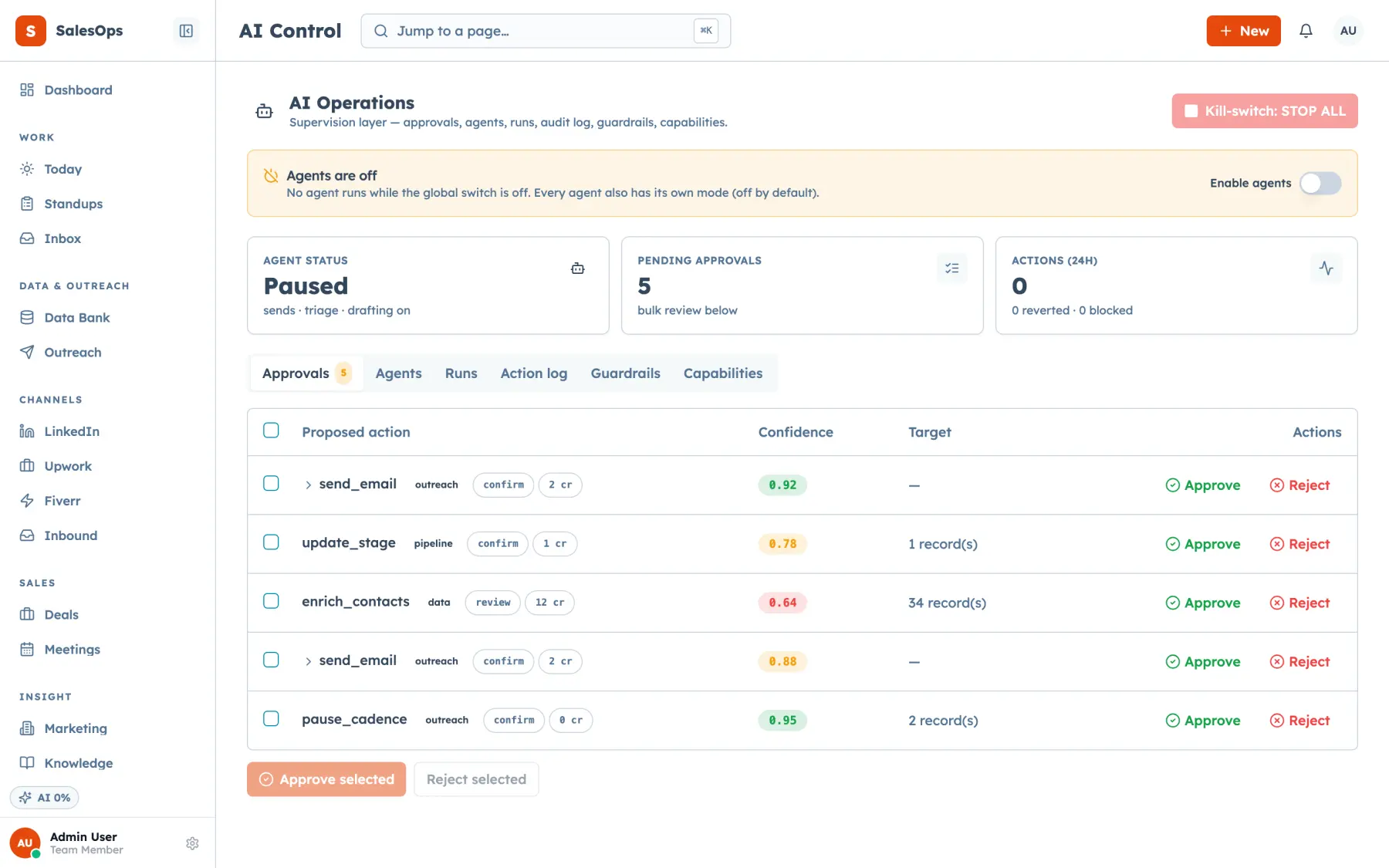
Every agent runs in a mode you set: off, draft, review or auto. Every external action lands in one approval queue, under guardrails, beside a kill switch that belongs to you.
Want to see it first? Book a demo
- Four modes per agent
- One approval queue
- Kill switch stops everything
The short answer
- Every SalesCrew agent ships in review mode, which means it writes the draft and stops, and a person approves, edits or rejects it before anything leaves the system.
- Any external send, whether email, a LinkedIn message, SMS or a marketplace proposal, is a review-class action by default, and spending money is human-only with no mode that changes that.
- One control on the Agents page stops every agent at once, and every tool call an agent makes is written to the audit log with the actor recorded as a user, a token or an agent.
What it does
Most products give you an on switch per bot. SalesCrew gives you a control plane. Each agent has a mode. Off does nothing. Draft writes the artefact and takes no action. Review queues the artefact for a person. Auto executes and logs, and falls back to review when its own confidence drops below the threshold you set. Every agent arrives in review, and moving one to auto is a decision you make on purpose after you have watched it work.
Above the modes sits a policy table, seeded on every instance and editable under Agents → Guardrails. It maps a class of action to a default, so you are not deciding case by case. The safe reflexes run on auto: research, enrichment, tagging, scoring, summaries, internal tasks, classifying a reply, pausing a cadence on reply, suppressing on unsubscribe. Sends, stage changes, merges and deletes default to review. Spending money and anything outside the CRM is human-only.
The review queue is one list grouped by agent. Each item shows the artefact, the evidence behind it: the thread, the score, the knowledge-base sources, then the confidence, and what the run cost. You can approve, edit and then approve, or reject, and a rejection reason feeds the next run rather than disappearing. Guardrails run underneath everything: at least three days between touches per contact, a per-cadence cap, per-mailbox and per-domain daily caps, a business-hours window, and a suppression re-check at the moment of send.
The MCP twins are the same controls. approval_list, approval_approve, approval_reject and approval_bulk work the queue. agent_set_mode changes a mode, including flipping everything off. agent_guardrails_set writes the rails, agent_runs shows what happened and what it cost, and agent_action_revert undoes an action that should not have run. Because the queue is a tool as well as a screen, you can approve from Claude at midnight and the audit row still says it was you.
The default policy table
Seeded on every instance, editable under Agents → Guardrails.
| Class of action | Default mode |
|---|---|
| Research, enrichment, tagging, logging, scoring, summaries, internal tasks, suggested contacts | Auto |
| Classify a reply, pause a cadence on reply, suppress on unsubscribe or bounce | Auto |
| Any external send: email, LinkedIn message, SMS or WhatsApp, marketplace proposal | Review |
| Create a deal from a positive reply, book a meeting | Review, then auto after a clean week |
| Stage changes, contact merge or delete | Review |
| Any spend (credits, connects, ads) and anything outside the CRM | Human only |
Modes: off (nothing) · draft (writes, does not act) · review (queues for a person) · auto (executes and logs, falls back to review below your confidence threshold).
What is different here
Each of these hangs off one of the five ideas the product is built on.
One queue, not one toggle per bot
Human in the loop: a per-bot autopilot switch is not a control plane. Modes, a policy table, guardrails, an audit log and one kill switch are.
Read moreThe controls are tools too
Agent-operable by design: approving, rejecting, changing a mode and reading a run's cost are all MCP tools, scoped by the same grants as your login.
Read moreYour key, your model, your cap
Your own database: bring your own AI key and it sits in the vault, is never shown again, and does not consume the plan's AI allowance.
Read moreGuardrails an agent cannot lift
Outbound-complete: touch spacing, daily caps and the suppression re-check at send are product rails, not agent settings, so no run can talk its way past them.
Read moreHow you get an agent working
This is the loop the whole product is designed around.
- 1
Connect
Set the AI provider, either the managed key with its allowance or your own key in the vault, then connect the mailbox or channel the agent will read.
- 2
Configure
Set the mode, the guardrails and the confidence threshold. Scope the agent's tools so it can only touch what it needs.
- 3
Run in review
Every artefact lands in the queue with its evidence, confidence and cost. Approve, edit, or reject with a reason that feeds the next run.
- 4
Move to auto
After a clean week, promote the classes you trust. Sends and spend can stay in review or human-only forever, and most teams should leave them there.
The agents you can switch on
The Inbox agent sweeps new threads every 15 minutes and drafts replies into your review queue. The chief-of-staff digest sends you one daily summary. The Campaign, LinkedIn, speed-to-lead, receptionist and Upwork bid and outcome agents each run in the same modes, under the same guardrails. On Core, you run agents through MCP from your own Claude or ChatGPT.
In which tier
| Tier | Price | What you get on agents |
|---|---|---|
| Core | $299/mo | Approval queue, action log, guardrails, kill switch and the scheduled-action engine. Agents operate through MCP; add in-product agents for $199/mo. |
| Local | With the phone and SMS pack | Inbox and speed-to-lead agents in review. |
| Outbound | $699/mo | In-product agents, plus the Campaign and LinkedIn agents. |
| Agency | $1,200/mo | Every agent, across one instance per client. |
AI is metered by a fair-use allowance: a soft alert at 80%, a hard stop at 100% for AI only. Manual paths never stop. Top-up is 1,000 credits for $10. Bring your own key for $99/mo and the allowance is not consumed.
Questions
- How do I stop an AI from emailing a client something wrong?
- Leave external sends in review, which is where they start. The agent writes the draft, the queue holds it with the thread and the sources it used, and nothing goes out until a person approves it. If something is already running that you want stopped, the kill switch on the Agents page halts every agent at once.
- What does auto mode actually mean?
- The agent executes and writes an audit row. If its own confidence for that run falls below the threshold you set, it falls back to review instead of acting. Auto is per class of action, not per agent, so you can auto-tag and still review every send.
- Which agents can I run?
- Every SalesCrew agent runs on the same control plane: Inbox, the chief-of-staff digest, Campaign, LinkedIn, speed-to-lead, receptionist and Upwork bid and outcome. Each one starts in review. The approval queue, action log, guardrails, kill switch and scheduled-action engine sit under all of them.
- What does an agent run cost?
- Each run records its cost, visible on the run and in the review queue item. AI is metered against a fair-use allowance per tier, with a soft alert at 80% and a hard stop at 100%. The hard stop applies to AI only; manual work never stops.
- Can I use my own Anthropic key?
- Yes, for $99/mo. Your key goes into the vault, is never displayed again, and your usage does not draw down the plan allowance.
- Can an agent delete my data?
- Merges and deletes are review-class by default, so they queue. On top of that, an agent's MCP token carries the same three-axis scopes as a user account, covering channel, marketplace profile and area, so it can only reach what you granted.
Run the first week in review
Turn one agent on, watch the queue, and promote only what earned it.
Want to see it first? Book a demo