Keep the list you send to separate from the list you sold to
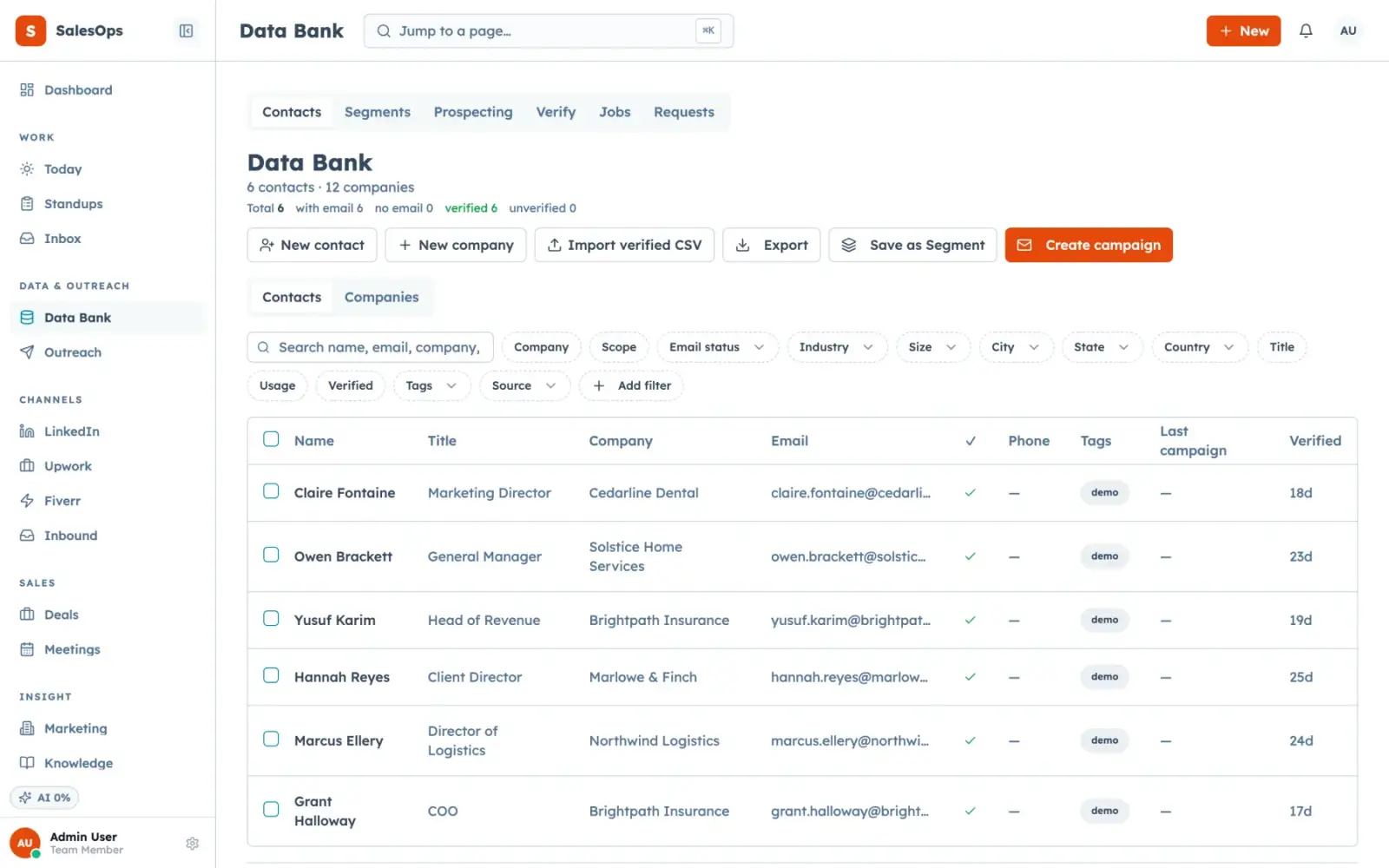
A pool that holds every contact and company you import or source, with ICPs, segments, and a suppression list that is enforced when an audience is frozen and checked again at send.
Want to see it first? Book a demo
- Pool separate from the CRM
- Suppression enforced at freeze
- Publish only what you want
The short answer
- The SalesCrew data bank is a staging pool: raw imported and sourced rows live there, and only the rows you publish become working contacts and companies in the CRM.
- An ICP defines who you want, a segment is a saved query over the pool, and freezing a segment into an audience is the moment the suppression list is applied to it.
- Suppression is checked twice, at freeze and again at the moment of send, so a contact who unsubscribed after the audience was built still does not receive the email.
What it does
The Data Bank page is a pool, not a second CRM. You import a CSV, or a source pushes rows in, and they sit there as raw records with whatever the source gave you. You query the pool, decide what is worth working, and publish those rows into contacts and companies. Publishing fills gaps rather than clobbering: if a record already exists with a phone number, an imported row without one does not erase it. That single rule is why a pool is worth having at all.
Sources are a CSV import, the Apollo provider for import and enrichment, a generic webhook that any scraper or vendor can post to, and an S3 CSV drop for bulk loads. Each source is registered, so a published row keeps its provenance and you can tell six months later where an address came from. A CSV import runs in three steps: pick the file, map the columns (SalesCrew guesses them and shows a preview), then tag the batch. Rows match existing contacts on email, existing values are filled in and never overwritten, and every import leaves an audit row. The guided import wizard walks a whole export from your old CRM through the same path, and duplicate detection and merge clean up whatever slipped through.
On top of the pool sit ICPs and segments. An ICP is the definition of a good-fit account: the filters that describe who you sell to. A segment is a saved query that returns the rows matching a filter set right now. When you freeze a segment into an audience for a cadence or campaign, the suppression list runs against it and the suppressed rows drop out. Unsubscribes, hard bounces and anything you add by hand all live on that one list, and it is global across every cadence rather than per-campaign.
The MCP twins cover the whole pool. data_bank_query reads it, data_bank_publish promotes rows into the CRM, icp_create and icp_list manage ICPs, segment_create and segment_list manage segments, and suppression_add, suppression_list and suppression_remove work the suppression list. contact_search, contact_create and contact_update handle published records. Sourcing runs are driven with sourcing_start and sourcing_list.
A vendor's "verified" flag is not a guarantee
What is different here
Each of these hangs off one of the five ideas the product is built on.
Raw rows never touch your CRM
Outbound-complete: the pool is staging. Published rows are the ones you chose, so a bad import does not pollute the pipeline you report on.
Read moreOne suppression list, applied twice
Human in the loop: suppression is global and enforced at audience freeze and again at send, rather than being a per-campaign checkbox someone forgets.
Read moreQuery the pool from an agent
Agent-operable by design: data_bank_query, segment_create and suppression_add are MCP tools, so building an audience can happen in a chat window under audit.
Read moreThe pool is yours
Your own database: the data bank is tables in your own Postgres project. Export is a full dump, so the list leaves with you rather than staying with us.
Read moreHow you get from a raw list to a safe send
Four steps, and the freeze is the one that matters.
- 1
Connect
Import a CSV, point a scraper at the generic webhook, drop files in the S3 bucket, or connect Apollo as a source.
- 2
Configure
Write the ICP, save a segment over the pool, and load anything you must never contact into the suppression list before you build an audience.
- 3
Run in review
Freeze a small audience, look at what the suppression pass removed, and publish only the rows you want as working contacts.
- 4
Move to auto
Let bounce and unsubscribe feedback write into suppression on its own. That class is auto by default, and it is the one you want running unattended.
Moving a whole CRM into the data bank
You export contacts, companies, deals, notes and tasks from your old CRM as CSV. The contacts go into the data bank through the CSV import, matched on email and filled in without overwriting. Companies and deals follow through the MCP tools contact_create, company_create and deal_create, so an agent can load them under your permissions and the audit log. Migration help is included on every tier, and a standard import completes within 7 business days.
Once you connect a mailbox, the first sync backfills the last 90 days of threads, so recent conversations sit beside the records you moved. You can take a full export of everything at any time.
In which tier
| Tier | Price | What you get on the data bank |
|---|---|---|
| Core | $299/mo | The pool, CSV import, the generic webhook, ICPs, segments, suppression at freeze and at send. No contact-count limit. |
| Local | With the phone and SMS pack | Core, plus DNC scrub at freeze for phone channels. |
| Outbound | $699/mo | Core, plus the Instantly send provider drawing on the same frozen audiences. |
| Agency | $1,200/mo | Outbound, plus the data sources (Apollo import and enrichment, S3 bulk loads) and one pool per client instance. |
Contacts are not metered on any tier and seats are unlimited. What is metered is model calls, SMS, call minutes and enrichment lookups.
Questions
- Can I upload a purchased list to this CRM?
- Yes. SalesCrew allows cold outbound, which most CRM acceptable-use policies forbid outright. Consent, CAN-SPAM, GDPR and every local rule stay with you, and the product enforces suppression, opt-out and the caps around sending.
- How does the suppression list actually work?
- It is one global list per instance. Unsubscribes and hard bounces write to it automatically, and you can add rows by hand or with suppression_add. It runs when a segment is frozen into an audience and again at the moment of send.
- Does it dedupe on import?
- Yes. Imported rows match existing contacts on email and fill gaps rather than overwriting, so a phone number or title is never wiped by a thinner row. Duplicate detection finds the pairs that slipped through, and merge folds them into one record.
- Where does the data come from?
- From you. CSV import, the Apollo provider, a generic webhook any scraper can post to, and S3 CSV drops. SalesCrew does not resell a contact database.
- Are emails verified before sending?
- Treat the source's verified flag as a hint. Send a small first batch, and SalesCrew writes every hard bounce into suppression automatically, so the next send skips that address.
- How many contacts can I hold?
- There is no contact count on the plan. The pool is tables in your own Postgres project, so the practical limit is the project, not a pricing tier.
Import a list and freeze one audience
Load your suppression list first, then watch what the freeze removes before anything sends.
Want to see it first? Book a demo