The full list of SalesCrew MCP tools
More than 140 named tools cover records, inbox, outreach, agents and reporting. Each one does exactly what its screen in the app does.
- 140+ MCP tools
- A screen twin for every tool
- Sends wait for approval
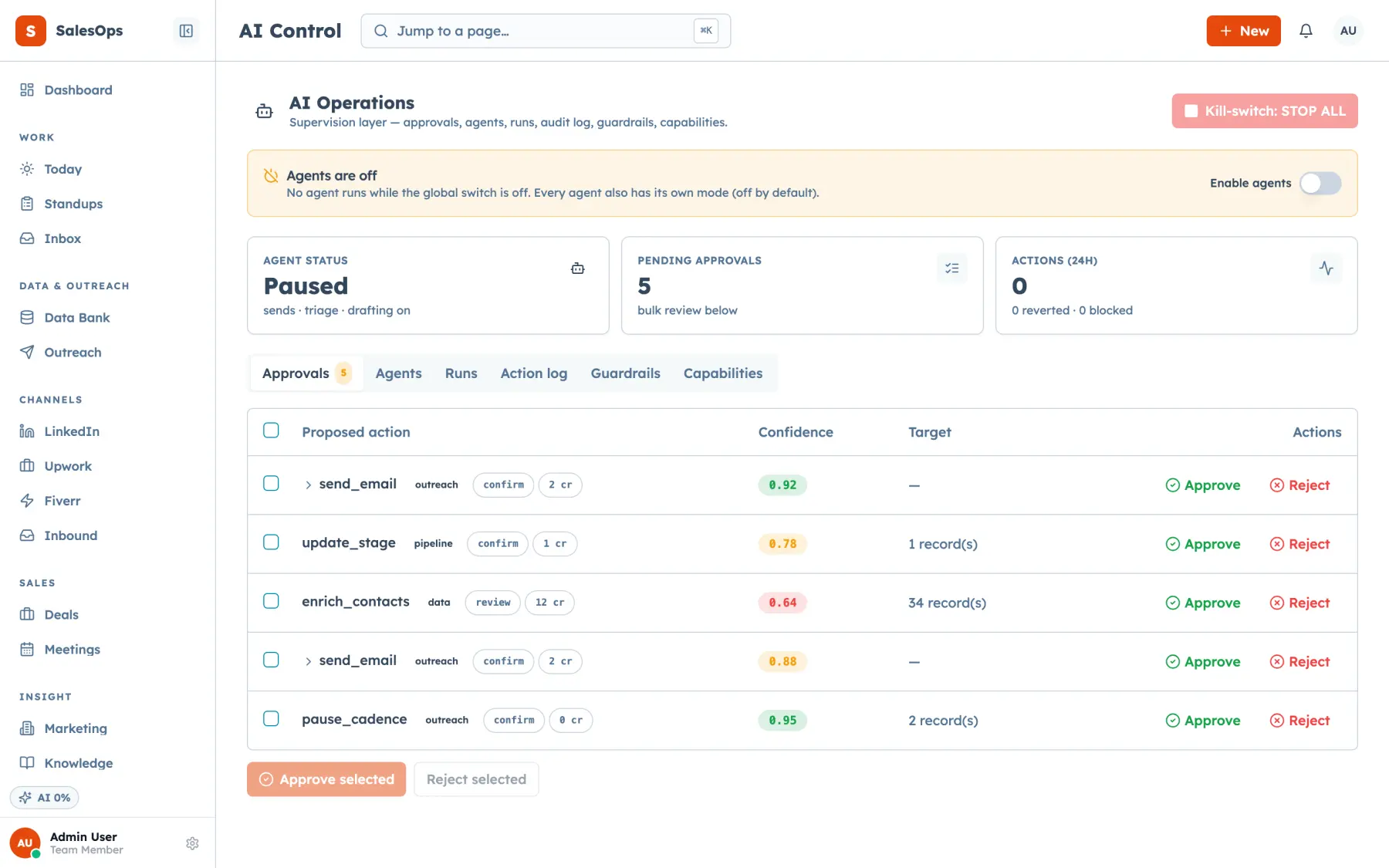
What the tool list tells you
- The SalesCrew MCP server exposes more than 140 tools, grouped on this page into 20 families that run from contacts and deals to webhooks and snapshots.
- Every SalesCrew tool has a twin screen in the app with an identical effect, so anything an agent does, a person can check or repeat by hand.
- A SalesCrew MCP token carries its owner's channel, marketplace profile and area scopes, so a token never reaches further than the person who issued it.
- Any external send an agent prepares through SalesCrew waits in the approval queue by default, and every tool call is written to the audit log with the actor named.
Mechanism
How an MCP client reaches the tools, and what controls each call.
| What | Mechanism | Direction | Objects | Status |
|---|---|---|---|---|
| Transport | MCP over HTTP, one server per SalesCrew instance | Both | 140+ tools | Available |
| Authentication | Per-user MCP token sent as a Bearer header | Inbound | MCP tokens | Available |
| Scopes | Channel, marketplace profile and area, the same three axes as a login | Inbound | Every tool call | Available |
| External sends | Approval queue, set to review by default | Outbound | Emails, LinkedIn messages, proposals | Available |
| Audit | One audit log row per call, naming the user, token or agent | Internal | Every tool call | Available |
| Clients | Claude, ChatGPT, Cursor and custom agents | Both | Any MCP client | Available |
Mechanism read from the SalesCrew MCP server, September 2026.
Tool reference by family
The tools most teams call, as they are named on the server. Your client lists the full set for your plan.
| Family | What it covers | Tools |
|---|---|---|
| Contacts and companies | Find, create and update people and companies, then find and merge duplicates. | contact_search · contact_create · contact_update · contact_delete · company_create · lead_update · duplicates_list · duplicates_merge · record_summary · search_all |
| Deals and pipelines | Create deals, move stages, link contacts, and score deals with the reasons written out. | deal_create · deal_get · deal_update_stage · deal_set_pipeline · deal_contact_add · deal_contacts_list · pipeline_list · pipeline_query · pipeline_stage_upsert · stalled_deals · score_get · score_recompute |
| Custom fields | Add fields to a record type and set their values. | custom_field_list · custom_field_upsert · custom_field_archive · custom_values_set |
| Tasks and notes | Create, update and close tasks, and add notes to any record. | task_create · task_list · task_update · task_delete · note_add · note_update · note_delete |
| Meetings and bookings | Log meetings and their outcomes, and match calendar bookings to contacts. | meeting_create · meeting_list · meeting_update · meeting_outcomes · booking_list · booking_link · booking_reconcile |
| Inbox | Read threads, draft and send replies, classify mail, assign threads and connect mailboxes. | inbox_threads · inbox_thread · inbox_draft_reply · inbox_reply_send · inbox_classify · inbox_relabel_thread · inbox_mark_read · inbox_triage_report · thread_assign · mailbox_connect · mailbox_list |
| Audiences | Define ICPs, build segments and keep the suppression list current. | icp_create · icp_list · segment_create · segment_list · segment_refresh · suppression_add · suppression_list · suppression_remove |
| Cadences and campaigns | Enrol contacts, pause or stop them, and run, pause or resume a campaign. | cadence_enroll · cadence_pause · cadence_resume · cadence_stop · cadence_status · cadence_funnel · campaign_create · campaign_run_now · campaign_pause · campaign_resume · campaign_send_stats · sequence_create · sequence_submit |
| Sender pool | Add mailboxes to the pool, set per-mailbox policy and check pool health. | pool_senders · pool_sender_add · pool_sender_set · pool_status · pool_domain_set · sender_set_policy |
| Salesforce send path | Push a campaign to Salesforce, send a list email and read send history. | salesforce_push · salesforce_list_campaigns · sf_send_list_email · sf_send_history · sf_pull_bounces |
| Data bank | Query sourced contacts and companies, and publish new rows into the bank. | data_bank_query · data_bank_publish · data_request_list · sourcing_start · sourcing_list |
| LinkedIn queue | Queue profiles for a person to message, and log the replies. | linkedin_queue_add · linkedin_queue_add_contacts · linkedin_queue_list · linkedin_queue_update · linkedin_reply_log |
| Calls | Start an outbound call through Vapi and log the result against the contact. | call_start · call_status · call_log |
| Approvals and scheduled actions | List what waits for a person, approve or reject it, and schedule an action for later. | approval_list · approval_approve · approval_reject · approval_bulk · action_schedule · action_list · action_cancel |
| Agents and AI | Set agent modes and guardrails, read runs and their cost, and manage the AI key. | agent_list · agent_set_mode · agent_guardrails_get · agent_guardrails_set · agent_policy_set · agent_runs · agent_run_now · ai_settings_get · ai_key_set · ai_usage_summary |
| Marketing and reporting | Read collected analytics and ad data, channel economics and the daily briefing. | marketing_kpis · marketing_breakdown · marketing_timeseries · marketing_pages · marketing_paid_organic · channel_economics · daily_briefing · weekly_report · team_kpis |
| Knowledge base | Search, add and retire the entries your agents draft from. | kb_search · kb_get · kb_upsert · kb_import · kb_topics · kb_deactivate |
| Upwork | Run saved job searches, preview and propose bids, and turn a job into a deal. | upwork_search_create · upwork_job_lookup · upwork_proposal_preview · upwork_proposal_propose · upwork_record_proposal · upwork_stats · create_deal_from_upwork_job |
| Users, access and tokens | Grant channels, profiles and areas, and issue or revoke MCP tokens. | users_list · user_set_role · user_grant_channel · user_grant_profile · user_grant_area · user_grant_revoke · my_access · mcp_token_issue · mcp_token_list · mcp_token_revoke |
| Webhooks, audit and snapshots | Manage outbound webhooks, query the audit log, and export or apply a configuration. | webhook_create · webhook_list · webhook_test · webhook_deliveries · webhook_retry · webhook_rotate_secret · audit_query · snapshot_export · snapshot_apply · billing_status · usage_summary |
Tool names as registered on the SalesCrew MCP server, checked 24 September 2026.
How token scopes shape the list
You don't get a separate permission system for automation. A SalesCrew MCP token carries the same three scopes as a login: the channels you can see, the marketplace profiles you can act on and the areas of the app you can open.
So the tool list is the menu, and the scopes decide what each token may order from it. A rep's token can search deals in the areas that rep works in. It can't grant access or issue tokens for someone else, because the rep's own login can't either.
Issue one token per agent and name it after the job. When an agent stops running, you revoke its token with mcp_token_revoke or from Settings, and nothing else changes.
Why sends stop at the approval queue
Some tools read, some write inside the CRM, and a few reach people outside it. SalesCrew treats that last group differently. Any external send made through a tool, whether an email, a LinkedIn message or a marketplace proposal, goes to the approval queue by default.
The queue groups items by agent and shows the artefact, the evidence and the cost. You approve it, or you reject it with a reason that feeds the agent's next run. Internal work such as tagging, scoring, summaries and logging runs on auto, since a late tag costs more than a wrong one you can fix.
Anything that spends money stays with a person. Model credits, marketplace connects and ad budget are human-only, and no mode setting on the agents page changes that.
What the audit log records for each call
Every tool call writes one row to the SalesCrew audit log. The row names the actor as a user, a token or an agent, with what changed and when.
So when a deal moves at 2am, you can see which token moved it. Filter the log with audit_query from your own client, or open it in the app. Both read the same rows.
Read the tool list from your own client
Four steps, the same in Claude, ChatGPT and Cursor.
- 1
Issue a token
Open Settings in SalesCrew and create an MCP token with a clear label. The token is shown once, so copy it before you close the dialog.
- 2
Add the server
Paste your instance's server URL and the token, sent as a Bearer header, into your MCP client's configuration.
- 3
Ask for the tools
Ask the client which SalesCrew tools it can call. It lists every tool in your plan's modules, each with its description.
- 4
Try one read
Run contact_search on a name you know, then open the audit log. Your token is the actor on the newest row.
Match the token to the family
Questions
- How many tools does the SalesCrew MCP server have?
- The SalesCrew MCP server has more than 140 tools, and the table on this page groups them into 20 families. Your client's tool list is the exact count for your instance, because it shows every tool in the modules your plan includes.
- Which SalesCrew tools send something outside the CRM?
- Replies from the inbox, campaign and cadence sends, Salesforce list sends and Upwork proposals all reach someone outside your team. Each of them waits in the approval queue by default, so a person approves the send before it leaves.
- Is every tool family on every plan?
- The MCP server, scoped tokens and webhooks come with every plan, starting with Core at $299 a month with unlimited seats. The Upwork and marketing families come with the Agency tier at $1,200 a month, which includes marketplaces and the marketing module.
- Does ChatGPT see the same tools as Claude?
- Yes. Claude, ChatGPT, Cursor and custom agents all connect to the same server on your instance. A token shows the same tools in every client, so you can switch clients without changing a scope.
Point your agent at 140+ tools
Every plan includes the MCP server, scoped tokens and the approval queue, with unlimited seats.